Author name: Diksha

Laptop

Best Laptops for Digital Marketing in 2026 (Complete Buyer’s Guide)

Introduction: Your Laptop Is Your Digital Marketing Office Picture this: You’re in the middle of optimizing a client’s Google Ads campaign, three browser tabs deep in Google Analytics, with Canva open for a social media post and a Zoom call about to start. Suddenly, your laptop freezes. Sound familiar? If you’ve ever lost a client because your laptop couldn’t keep up during a live campaign review, you already know the truth: in digital marketing, your laptop isn’t just a tool — it’s your entire office, your creative studio, and your client-facing storefront, all rolled into one. Whether you’re a beginner learning the basics of SEO, a freelancer juggling five clients at once, or an agency owner managing a full team, the right laptop can be the difference between smooth, profitable workdays and constant frustration. In this complete buyer’s guide, we’ll walk you through exactly what specifications matter for digital marketing work, which laptops genuinely deliver in 2026, and how to choose the perfect one for your budget and workflow — without the confusing tech jargon. 🎯 Expert Tip: Why Trust This Guide? At DIGIDIKSHA, we work with SEO experts, content teams, PPC specialists, and WordPress developers every single day. This guide is based on real-world usage patterns of digital marketing professionals, not just spec sheets. Why Choosing the Right Laptop Matters for Digital Marketing Digital marketing is not a single-task job. On any given day, you might be: Running SEO audits with 20+ browser tabs open (Ahrefs, SEMrush, Search Console) Managing Google Ads and Meta Ads dashboards simultaneously Designing graphics in Canva or Photoshop for social media Editing short-form videos for Reels and YouTube Shorts Writing blog content while researching keywords Building or updating WordPress websites with Elementor Hopping between Zoom calls and Slack messages with clients Each of these tasks pulls on different laptop resources — RAM for multitasking, processor power for design and video rendering, display quality for accurate color work, and battery life for working on the go. A laptop that’s underpowered will slow down every single one of these workflows, costing you time, money, and client trust. On the other hand, investing in the right machine means faster campaign turnarounds, smoother client presentations, and the ability to confidently take on more demanding projects — including video editing and design work — without your laptop becoming the bottleneck. Key Laptop Specifications That Matter Most for Digital Marketers 1. Processor (CPU) The processor is the brain of your laptop. For digital marketing work — especially multitasking between ad dashboards, analytics tools, and design software — you want at least an Intel Core Ultra 5/7, AMD Ryzen 7, or Apple M-series chip. Intel Core Ultra (Series 2/3, ‘Panther Lake’): Great all-round performance with efficient AI acceleration for Copilot-style tools. Intel Core i5/i7/i9 (older generation): i5 is fine for basic marketing tasks; i7/i9 is better for video editing and design-heavy work. AMD Ryzen 5/7/9: Excellent multi-core performance for the price, good for content creation and multitasking. Apple M-Series (M4/M5): Outstanding performance-per-watt, ideal for design, video editing, and all-day battery efficiency. 2. RAM (Memory) RAM determines how many apps and browser tabs you can run smoothly at once — and for digital marketers, this is arguably the single most important spec. 8GB: Only suitable for absolute basics (email, simple blogging). Not recommended in 2026. 16GB: The sweet spot for most digital marketers — SEO, content writing, WordPress, Canva, and moderate multitasking. 32GB: Ideal for agencies, video editors, and anyone running Adobe Suite, multiple ad platforms, and AI tools simultaneously. 3. SSD Storage Always choose an SSD (Solid State Drive) over a traditional HDD — SSDs are dramatically faster for booting up, loading apps, and exporting videos. 256GB: Fine only if you rely heavily on cloud storage (Google Drive, Dropbox). 512GB: A comfortable baseline for most digital marketing professionals. 1TB or more: Recommended for content creators, video editors, and anyone storing large client asset libraries. 4. Display Quality A sharp, color-accurate display matters enormously for designers, content creators, and anyone reviewing ad creatives. Look for Full HD (1920×1080) at minimum, though a 2K or higher OLED panel is a huge upgrade for Canva, Photoshop, and video work. 5. Battery Life Freelancers and agency owners who work from cafes, client offices, or while traveling need at least 8-10 hours of real-world battery life. Apple’s M-series laptops currently lead this category by a wide margin. 6. Keyboard & Trackpad If you write content, manage social media captions, or handle email marketing all day, a comfortable, well-spaced backlit keyboard reduces fatigue significantly during long writing sessions. 7. Build Quality Digital marketing professionals often travel to client meetings — a laptop with an aluminum or magnesium-alloy chassis will survive daily commuting far better than plastic-bodied budget models. 8. Weight & Portability If you’re a freelancer or agency employee visiting clients regularly, anything under 1.5kg is ideal. Heavier creator laptops (1.8kg-2.2kg) are still manageable if you mostly work from a fixed desk. 9. Webcam Quality With client calls, webinars, and video-based reporting becoming standard, a 1080p webcam with good low-light performance is now a genuine must-have, not a luxury. 10. Graphics (GPU) Most digital marketing tasks don’t need a dedicated GPU. However, if you do heavy video editing (Premiere Pro) or 3D/motion graphics work, a discrete GPU like the NVIDIA RTX 5050/5060 speeds up rendering and exports considerably. 11. Wi-Fi & Connectivity Look for Wi-Fi 6E or Wi-Fi 7 support for faster, more stable connections — essential when uploading large video files or running live ad dashboards during client calls. 12. Ports At minimum, you want 2+ USB-C/Thunderbolt ports, one USB-A port for older peripherals, and ideally an SD card reader if you shoot content on a camera. 13. Upgradeability Many ultra-thin laptops (including all three recommended below) now have soldered RAM, meaning you cannot upgrade memory later. Choose your RAM configuration carefully at the time of purchase. Which Specifications Matter Most for Your Specific Digital Marketing Tasks? SEO (Ahrefs, SEMrush, Search Console) 16GB RAM is
Email Marketing

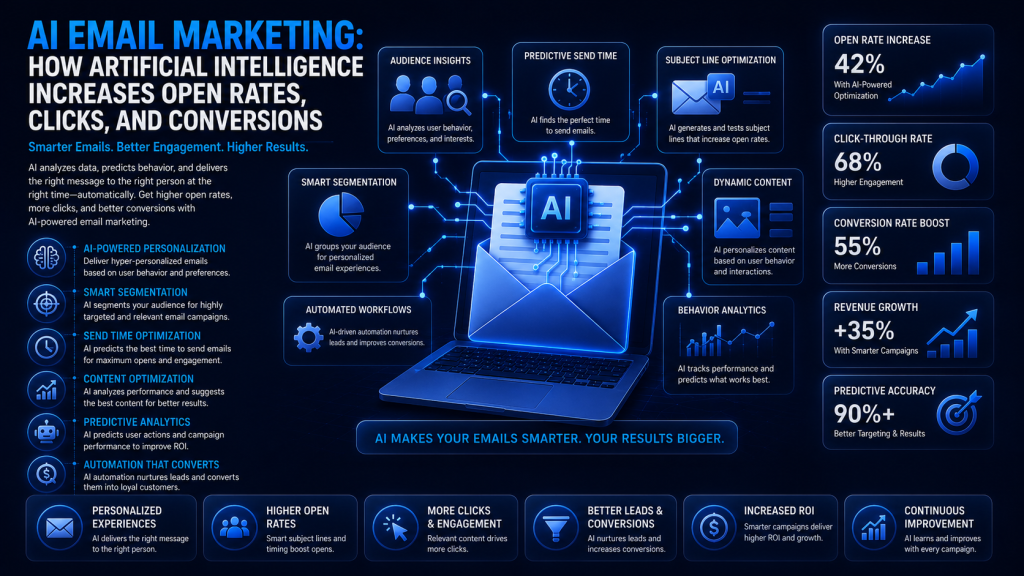
AI Email Marketing: How Artificial Intelligence Increases Open Rates, Clicks, and Conversions

Introduction AI email marketing uses artificial intelligence to personalize content, predict the best send times, and optimize campaigns automatically. Businesses are adopting it because it consistently improves open rates, clicks, and conversions while saving hours of manual work. This guide explains how AI is transforming email marketing and how you can start using it today. What Is AI Email Marketing? AI email marketing applies machine learning and predictive analytics to traditional email campaigns. Instead of sending the same message to your entire list at a fixed time, AI tailors content, timing, and subject lines to each subscriber based on their behavior and preferences. How AI Is Transforming Email Marketing AI removes much of the guesswork from email marketing. It analyzes historical engagement data to predict what content, timing, and offers will resonate with each subscriber, then automatically adjusts campaigns for better performance without constant manual oversight. Benefits of AI Email Marketing Higher open rates through optimized subject lines Better click-through rates from relevant content Increased conversions via personalized recommendations Smarter, dynamic audience segmentation Significant time savings through automation Improved ROI and more efficient campaign optimization AI Email Marketing vs Traditional Email Marketing Factor Traditional Email Marketing AI Email Marketing Personalization Basic (name, company) Deep, behavior-based Segmentation Manual, static lists Dynamic, predictive Subject Lines Manually written AI-generated & tested Send Time Fixed schedule Predicted optimal time Content Creation Fully manual AI-assisted drafting Optimization Periodic A/B tests Continuous, automated Scalability Limited by manual effort Scales with automation How AI Works in Email Marketing Machine learning identifies patterns in subscriber behavior Predictive analytics forecasts likely engagement and purchases Natural Language Processing (NLP) helps generate and refine copy Dynamic content adjusts automatically per recipient Smart automation triggers emails based on real-time actions Key AI Email Marketing Features AI-generated and tested subject lines AI-powered email copywriting assistance Smart audience segmentation Predictive send-time optimization Personalized product recommendations Automated lead nurturing and lifecycle workflows Cart abandonment recovery sequences AI-powered A/B testing and performance predictions Step-by-Step Guide to Implement AI Email Marketing Define clear campaign goals Choose an AI-enabled email marketing platform Build and segment your email list Create AI-assisted email content Set up automated workflows and triggers Personalize campaigns using behavioral data Test variations and optimize continuously Analyze results and refine your strategy Best AI Email Marketing Tools Mailchimp AI – beginner-friendly automation and content suggestions HubSpot AI – CRM-integrated personalization at scale Klaviyo – strong for e-commerce segmentation and predictions ActiveCampaign – advanced automation workflows Brevo and Omnisend – affordable AI features for small businesses ChatGPT, Gemini, and Claude – AI assistance for email copywriting Real-World Use Cases E-commerce product recommendations based on browsing history AI-optimized welcome email series for new subscribers Lead nurturing campaigns tailored to buyer intent Abandoned cart recovery with dynamic incentives Re-engagement campaigns for inactive subscribers Common AI Email Marketing Mistakes Over-automating and losing the human touch Using generic “personalization” that feels robotic Ignoring data privacy and consent requirements Buying email lists instead of growing organically Skipping testing before scaling a campaign Relying entirely on AI-generated content without review AI Email Marketing Best Practices Always review and edit AI-generated content before sending Use behavioral data, not just demographics, for segmentation Test AI-suggested subject lines against your own Combine automation with periodic manual campaign reviews Respect privacy regulations like GDPR and CAN-SPAM Continuously monitor performance and refine workflows How to Measure Success Open rate and click-through rate (CTR) Conversion rate and revenue per email Bounce rate, unsubscribe rate, and spam complaint rate Overall engagement rate and ROI Frequently Asked Questions Is AI email marketing expensive? Many platforms include AI features at standard pricing tiers, making it accessible for small businesses and larger companies alike. Does AI email marketing comply with GDPR and CAN-SPAM? AI tools don’t override compliance requirements; businesses still need proper consent and opt-out processes regardless of automation. Can small businesses benefit from AI email marketing? Yes. Even basic AI segmentation and subject line testing can meaningfully improve results for smaller email lists. Will AI replace human marketers? No. AI handles repetitive optimization tasks, but human oversight remains essential for brand voice, strategy, and creative direction Future of AI Email Marketing Hyper-personalization based on real-time behavior Predictive customer journeys across multiple channels AI agents managing entire campaign workflows autonomously Privacy-first AI marketing built around first-party data Conclusion AI email marketing is quickly becoming essential for businesses that want higher engagement and stronger long-term growth. By combining AI-powered personalization, automation, and continuous optimization with thoughtful human oversight, you can build email campaigns that consistently perform better and scale efficiently. Transform Your Email Marketing With DIGIDIKSHA DIGIDIKSHA offers expert AI-powered email marketing and automation services, from strategy to execution. Contact us today for a free consultation, email marketing audit, and a customized AI automation strategy built to increase your open rates, clicks, and conversions.

Digital Marketing

Top Digital Marketing Trends for 2026

Introduction Digital marketing keeps shifting as AI, privacy rules, and consumer behavior evolve. Businesses that stay updated gain a real competitive edge; those that don’t fall behind quickly. This guide covers the trends that matter most in 2026 and how to act on them. Why Following Digital Marketing Trends Matters Stronger competitive advantage in your industry Better customer experience and engagement Improved ROI from marketing spend More sustainable, long-term business growth Top Digital Marketing Trends for 2026 AI-Powered Marketing & Generative AI AI tools now help generate content, analyze data, and personalize campaigns at scale. Businesses should use AI to speed up production while keeping human review for accuracy, tone, and brand voice. AI Overviews & AI Search Optimization Google’s AI Overviews are reshaping search results. Ranking well now means creating clear, well-structured, genuinely helpful content that AI systems can easily summarize and cite. SEO Beyond Keywords: Topical Authority & E-E-A-T Modern SEO rewards sites that demonstrate real experience and expertise across a topic, not just keyword-optimized pages. Build content clusters that cover a subject comprehensively. First-Party Data & Privacy-First Marketing As third-party cookies fade, collecting first-party data through signups, surveys, and loyalty programs becomes essential for personalization and targeting. Hyper-Personalization Customers expect tailored experiences based on their behavior and preferences. Use segmentation and dynamic content to deliver relevant messaging across every channel. Marketing Automation Automated workflows for email, lead nurturing, and follow-ups save time while improving consistency and response speed across the customer journey. Voice and Visual Search Optimization More users search by voice or image. Optimize content with natural, conversational phrasing and descriptive image alt text to capture this growing traffic. Short-Form Video & YouTube Marketing Short-form video continues to drive high engagement, while YouTube remains a powerful search engine for long-form, educational content. LinkedIn Marketing for B2B LinkedIn remains the top platform for reaching business decision-makers through thought leadership content and targeted outreach. Influencer & Creator Partnerships Micro-influencers often deliver stronger engagement and trust than large-scale influencers, especially for niche audiences. Community-Led Marketing Brands are building owned communities on platforms like Discord and private groups to deepen loyalty beyond one-off transactions. Interactive Content Quizzes, polls, and calculators boost engagement and generate first-party data while providing genuine value to visitors. Conversational Marketing AI chatbots and assistants now handle common questions instantly, improving response time and freeing teams for higher-value conversations. Email Marketing Automation & Personalization Behavior-triggered, personalized email sequences continue to deliver some of the highest ROI in digital marketing. Omnichannel Customer Experience Customers expect a seamless experience across website, social, email, and in-store touchpoints, requiring integrated marketing systems. Conversion Rate Optimization (CRO) Testing and refining landing pages, CTAs, and checkout flows squeezes more value from existing traffic without increasing ad spend. Local SEO & Google Business Profile An optimized Google Business Profile with reviews and accurate details remains critical for local search visibility. Data Analytics & Predictive Marketing Predictive analytics helps forecast customer behavior, allowing marketers to act proactively rather than reactively. Emerging Technologies Shaping Marketing AI agents automating multi-step marketing tasks Customer Data Platforms (CDPs) unifying customer data Early-stage AR and VR experiences for select industries How Small Businesses Can Adapt Prioritize one or two high-impact trends at a time, such as Google Business Profile optimization and email automation, using affordable tools before expanding into more advanced AI or automation systems. Common Mistakes to Avoid Chasing every new trend without a clear strategy Ignoring analytics and performance data Over-relying on AI without human review Neglecting mobile optimization Publishing low-quality, unhelpful content Best Practices for 2026 Build topical authority instead of chasing single keywords Invest in first-party data collection early Combine AI efficiency with human oversight Prioritize customer experience across every channel Test and measure every campaign before scaling Measuring Success Organic traffic and conversion rate Customer acquisition cost (CAC) and CLV ROAS and engagement rate Track these using Google Analytics 4, Google Search Console, and Looker Studio. Frequently Asked Questions Is SEO still important in 2026? Yes. SEO has evolved toward topical authority and AI search optimization, but strong, helpful content remains essential. How can small businesses compete with limited budgets? Focus on high-impact, low-cost trends like local SEO and email automation before investing in advanced AI tools. Which trend should beginners focus on first? Start with first-party data collection and email marketing automation, since both build a foundation for every other strategy. Conclusion Digital marketing in 2026 rewards businesses that combine AI efficiency with genuine customer focus. Prioritize the trends most relevant to your goals, test consistently, and keep learning to build a future-ready marketing strategy. Future-Proof Your Marketing With DIGIDIKSHA DIGIDIKSHA offers expert SEO, AI search optimization, Google Ads, content marketing, and complete digital marketing services to help your business stay ahead of the competition. Contact us today to schedule a consultation and build a strategy that drives sustainable growth in 2026 and beyond.

Google Ads

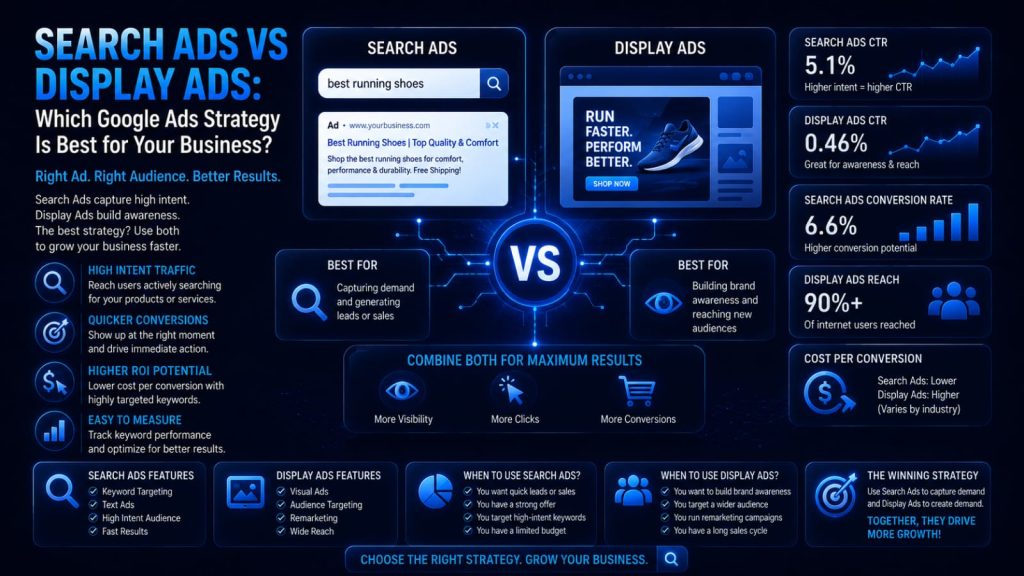
Search Ads vs Display Ads: Which Google Ads Strategy Is Best for Your Business?

Introduction Paid advertising is essential for consistent business growth, but many advertisers struggle to choose between Search Ads and Display Ads. Both live inside Google Ads, yet they work in very different ways. This guide compares them clearly so you can choose the right strategy for your goals. What Are Search Ads? Search Ads are text-based ads that appear on Google’s search results page when someone searches for a related keyword. Because they target active search intent, they’re highly effective for capturing demand from people already looking for a solution. Advantage: high purchase intent and strong conversion potential Limitation: can be competitive and costly for popular keywords What Are Display Ads? Display Ads are visual banner ads shown across the Google Display Network, a collection of millions of websites, apps, and videos. They target audiences based on interests, demographics, and behavior rather than active searches. Advantage: broad reach and strong visual brand storytelling Limitation: lower intent, so conversions are typically lower per click Search Ads vs Display Ads: Quick Comparison Factor Search Ads Display Ads Purpose Capture existing demand Build awareness & reach Format Text-based Image, banner, responsive Targeting Keywords, search intent Audience, interests, placements Cost Model Mostly CPC Mostly CPM Typical CTR Higher Lower Best For Lead gen, sales, local intent Brand awareness, remarketing When Should You Use Search Ads? Local service businesses with high purchase intent Emergency or urgent-need services E-commerce product searches with clear buying intent Lead generation campaigns targeting specific keywords When Should You Use Display Ads? Building brand awareness for a new product or business Remarketing to past website visitors Visual storytelling for lifestyle or aspirational brands Expanding reach to new, relevant audiences Search Ads vs Display Ads by Business Type Local businesses: Search Ads for immediate, nearby demand SaaS companies: Search Ads for intent, Display for awareness E-commerce: both, with Display for remarketing B2B companies: Search Ads for high-intent lead capture Startups: Display Ads to build early brand recognition Cost Comparison Search Ads typically use a Cost Per Click (CPC) model and can range widely based on keyword competition. Display Ads often use Cost Per Mille (CPM), pricing based on impressions, making them more affordable for broad reach campaigns. Targeting Options Search Ads: Keyword targeting, match types, negative keywords, location, device, and ad scheduling. Display Ads: Custom audiences, affinity and in-market audiences, demographics, topics, placements, and remarketing lists. Optimization Strategies For Search Ads: Improve Quality Score and Ad Relevance Optimize landing pages for conversions Refine keyword research regularly For Display Ads: Use Responsive Display Ads for better reach Segment audiences carefully Apply frequency capping to avoid ad fatigue Common Mistakes Search Ads: Using overly broad keywords without negatives Weak ad copy that ignores search intent Display Ads: Poor audience targeting leading to wasted spend Weak creatives that trigger banner blindness Skipping remarketing entirely Best Practices Match campaign type to funnel stage and goal Test Search and Display together for full-funnel coverage Use remarketing to re-engage past visitors Continuously test ad copy and creatives Monitor Quality Score and audience performance Measuring Success CTR, CPC, and CPM by campaign type Conversion rate and cost per acquisition (CPA) Return on ad spend (ROAS) and impression share Use Google Ads, Google Analytics 4, and Looker Studio to track and compare performance across both campaign types. Frequently Asked Questions 1.Which is better: Search Ads or Display Ads? Neither is universally better; Search Ads suit high-intent conversions while Display Ads suit brand awareness and remarketing. 2.Can I use both campaign types together? Yes, many successful strategies combine Search Ads for capturing demand with Display Ads for building awareness and remarketing. 3.Are Display Ads cheaper than Search Ads? Generally yes on a per-impression basis, though Search Ads often deliver higher conversion rates per click. Conclusion The right choice between Search Ads and Display Ads depends on your business goals, audience, and funnel stage. Many businesses benefit from combining both: Search Ads to capture active demand and Display Ads to build awareness and stay top of mind through remarketing. Build Your Google Ads Strategy With DIGIDIKSHA DIGIDIKSHA offers expert Google Ads management, PPC optimization, and complete digital marketing services to help you choose and execute the right advertising strategy. Contact us today to schedule a consultation and build a data-driven Google Ads strategy that drives real business growth.

Email Marketing

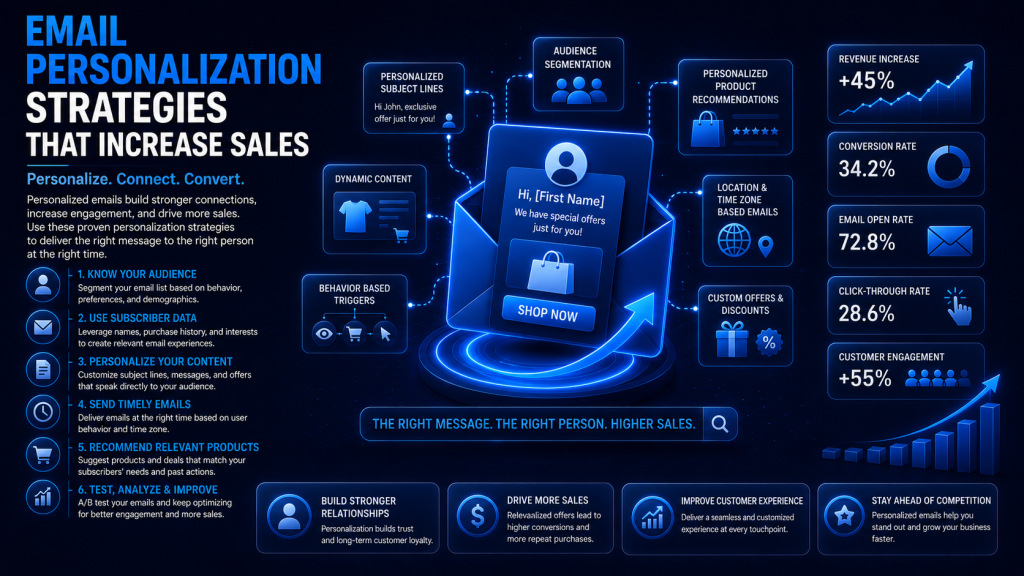
Email Personalization Strategies That Increase Sales

Introduction Generic, one-size-fits-all emails get ignored. Personalized emails, built around real customer data, consistently earn higher opens, clicks, and sales. This guide breaks down how to use email personalization strategically to build stronger customer relationships and drive measurable revenue. What Is Email Personalization? Email personalization means tailoring content, offers, and messaging to individual subscribers based on their data and behavior. Basic personalization uses a first name; advanced personalization uses purchase history, browsing behavior, and lifecycle stage to shape entire campaigns. Why Personalization Increases Sales Higher open rates from relevant subject lines Increased click-through rates on tailored content Stronger customer engagement and trust Improved conversion rates and revenue per email Higher customer lifetime value over time Types of Email Personalization First-name and basic demographic personalization Location-based offers and content Purchase history and browsing behavior triggers Customer interests and lifecycle stage targeting Dynamic product recommendations and offers Build a Strong Customer Data Strategy Collect customer data ethically through clear consent, such as signup forms and preference centers. Keep data clean and up to date, segment audiences thoughtfully, and stay mindful of privacy regulations like GDPR and CAN-SPAM when handling customer information. Email Segmentation Strategies Demographics: age, gender, or job role Geography: location-based offers and timing Purchase history: repeat buyers vs. first-timers Engagement level: active vs. inactive subscribers Customer lifecycle: new, returning, or lapsed customers Personalized Campaigns That Drive Sales Welcome emails introducing new subscribers to your brand Product recommendations based on browsing or purchases Abandoned cart and browse abandonment reminders Birthday and anniversary offer  Re-engagement campaigns for inactive subscribers Loyalty program and upsell/cross-sell emails Dynamic Content in Email Marketing Dynamic content changes automatically based on the recipient, showing different images, products, or offers to different segments within the same email template. This increases relevance without requiring separate campaigns for every audience segment. Marketing Automation for Personalization Automation workflows trigger emails based on customer actions, such as a purchase, cart abandonment, or website visit. Combined with CRM integration, these workflows nurture leads and guide customers through the funnel with minimal manual effort. Best Practices for Email Personalization Write subject lines that reflect real customer interests Use customer names naturally, not excessively Segment audiences before designing campaigns Personalize CTAs to match customer intent Test send times for different segments A/B test personalization strategies regularly Avoid over-personalization that feels invasive Common Personalization Mistakes Using outdated or incorrect customer data Over-personalizing in ways that feel intrusive Poor or overly broad segmentation Ignoring mobile email optimization Sending offers irrelevant to the customer Skipping A/B testing on personalized campaigns Emailing too frequently and causing fatigue Measuring Success Open rate and click-through rate (CTR) Conversion rate and revenue per email Unsubscribe rate and bounce rate Customer lifetime value (CLV) and overall ROI Track these metrics using tools like Klaviyo, Mailchimp, HubSpot, and Google Analytics 4. Frequently Asked Questions 1.Does personalization really increase sales? Yes, personalized emails consistently outperform generic campaigns in open rates, clicks, and conversions when built on accurate customer data. 2.Can small businesses use email personalization? Yes. Even basic segmentation and first-name personalization can meaningfully improve engagement for small email lists. 3.Is email personalization expensive to implement? Most modern email platforms include segmentation and automation features at accessible price points, making personalization achievable for most budgets. Conclusion Email personalization transforms generic campaigns into relevant, revenue-driving conversations with your customers. Start with solid data collection and segmentation, then layer in automation and dynamic content to build campaigns that consistently increase engagement and sales. Build Personalized Campaigns With DIGIDIKSHA DIGIDIKSHA offers expert email marketing, marketing automation, customer segmentation, and complete digital marketing services to help you build personalized campaigns that convert. Contact us today to schedule a consultation and start driving measurable sales growth through smarter, more relevant email marketing.

Email Marketing

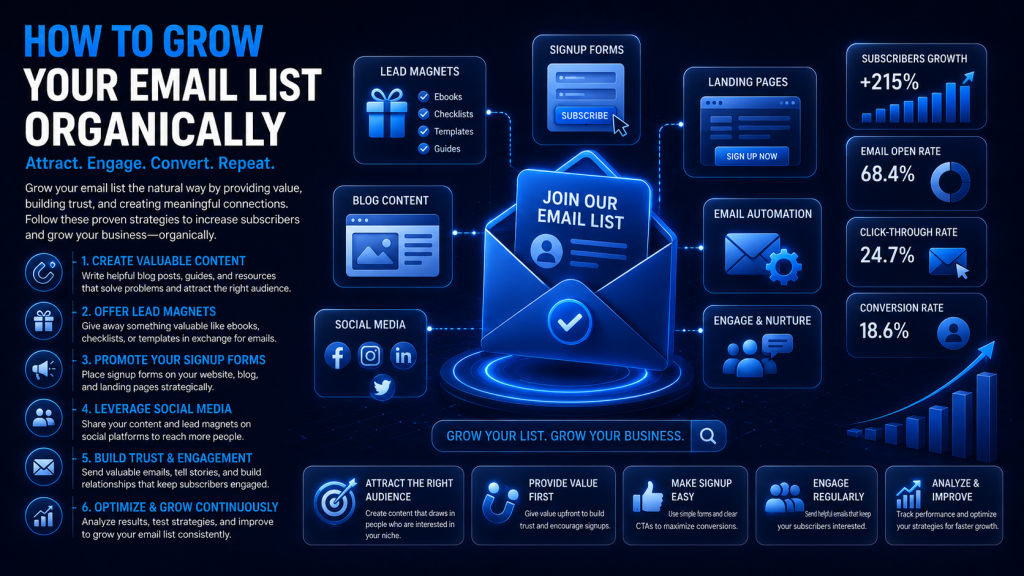
How to Grow Your Email List Organically

Introduction Email marketing remains one of the highest-ROI channels in digital marketing, but only when your list is built the right way. A smaller, engaged list of people who genuinely want to hear from you will always outperform a large, purchased list. This guide covers how to grow your email list organically, using ethical, permission-based strategies. What Is Organic Email List Growth? Organic email list growth means earning subscribers through content, value, and consent, rather than buying contact lists. It relies on permission-based marketing, where people willingly opt in because they trust your brand and want what you offer. Why Organic Growth Matters Higher engagement and open rates Better email deliverability and sender reputation Stronger customer trust and relationships Higher conversion rates over time Compliance with email marketing regulations Know Your Target Audience Before asking for an email address, understand who your ideal subscriber is. Identify their pain points, interests, and what stage of the buyer journey they’re in, then build content and offers that speak directly to those needs. Create an Irresistible Lead Magnet E-books and in-depth guides for complex topics Checklists and templates for quick, practical wins Free tools or calculators for interactive value Webinars and free courses for deeper engagement Discount codes for e-commerce audiences Match the lead magnet format to what your specific audience finds most valuable and easy to consume. Optimize Your Website for Signups Homepage and blog opt-in forms Well-timed exit-intent popups Sticky bars and slide-in forms Dedicated, focused landing pages Mobile-friendly forms with minimal fields Create Content That Attracts Subscribers Evergreen blog posts, videos, infographics, and downloadable resources naturally encourage signups when they solve real problems. Strong SEO ensures this content reaches new visitors who are actively searching for solutions. Use SEO to Drive Organic Subscribers Target keywords that match search intent, optimize on-page elements, and build internal links between related content. Ranking in search results and AI Overviews brings a steady stream of new visitors who can convert into subscribers. Promote Your Newsletter Organically Share newsletter highlights on LinkedIn and Instagram Engage in relevant communities and forums Guest blog on industry-relevant sites Mention your newsletter during webinars and podcasts Partner with complementary brands for cross-promotion Improve Signup Conversion Rates Write clear, benefit-driven CTAs Reduce form fields to the essentials Add social proof and subscriber testimonials A/B test different signup form designs Improve page speed and mobile experience Welcome New Subscribers A strong welcome sequence introduces your brand, delivers the promised lead magnet, sets expectations for email frequency, and encourages early engagement, such as replying or following on social media. Segment and Nurture Your List Segment by interests, behavior, or purchase history Personalize campaigns based on subscriber activity Build automation workflows for consistent nurturing Run re-engagement campaigns for inactive subscribers Regularly clean your list to maintain deliverability Common Email List Building Mistakes Buying email lists instead of growing organically Offering a weak or irrelevant lead magnet Writing vague, low-urgency CTAs Asking for too much information upfront Ignoring mobile form optimization Sending inconsistent or infrequent emails Never removing inactive subscribers Best Practices for Sustainable List Growth Always use double opt-in for quality subscribers Keep lead magnets specific and highly relevant Test CTAs and form placement regularly Prioritize value over frequency in every email Monitor deliverability and sender reputation Combine SEO, content, and social promotion together Measuring Success Subscriber growth rate and signup conversion rate Open rate and click-through rate (CTR) Unsubscribe rate and bounce rate Overall email marketing ROI Track these using tools like Mailchimp, ConvertKit, HubSpot, and Google Analytics 4. Frequently Asked Questions 1.Why shouldn’t I buy email lists? Purchased lists have low engagement, hurt deliverability, and often violate email marketing regulations and platform terms of service. 2.How often should I email subscribers? Weekly or biweekly is a reliable starting point; prioritize consistency and value over sheer frequency. 3.Is email marketing still effective? Yes, it remains one of the highest-ROI channels, especially when the list is built organically and nurtured consistently. Conclusion Organic email list growth takes more patience than buying a list, but it delivers a subscriber base that actually engages, trusts your brand, and converts. Focus on valuable lead magnets, smart SEO, and consistent nurturing to build a list that drives long-term growth. Grow Your Email List With DIGIDIKSHA DIGIDIKSHA offers expert email marketing, lead generation, content marketing, and complete digital marketing services to help you build a high-quality, organically grown subscriber base. Contact us today to schedule a consultation and turn your email list into a sustainable growth engine.

Google Ads

Google Ads Quality Score Explained

Introduction Google Ads is one of the most powerful advertising platforms available, but two advertisers bidding the same amount can get very different results. The difference often comes down to Quality Score. This guide explains what it is, why it matters, and exactly how to improve it. What Is Google Ads Quality Score? Quality Score is Google’s rating, on a scale of 1 to 10, of how relevant and useful your keywords, ads, and landing pages are to searchers. You can view it in the Google Ads dashboard at the keyword level. A common misconception is that Quality Score directly determines cost, when in fact it’s a diagnostic signal that feeds into the auction. Why Quality Score Matters Quality Score directly influences Ad Rank, which determines your ad position and the price you pay per click. A higher Quality Score often means lower CPC and better ad positions for the same bid, improving overall budget efficiency and return on ad spend. How Google Calculates Quality Score Expected Click-Through Rate (Expected CTR) This measures how likely your ad is to be clicked when shown for a given keyword. Improve it by writing compelling, relevant ad copy that matches what searchers are looking for. Ad Relevance This reflects how closely your ad copy matches the intent behind the keyword. Tight keyword grouping and specific, intent-matched ad text improve relevance significantly. Landing Page Experience Google evaluates whether your landing page is relevant, fast, mobile-friendly, easy to navigate, and trustworthy, with a clear path to conversion. The Quality Score Scale Scores of 7 to 10 are generally considered strong, 4 to 6 average, and 1 to 3 poor. Remember that Quality Score is a diagnostic metric to guide optimization, not a KPI to chase for its own sake. Factors That Influence Quality Score Keyword relevance and search intent alignment Ad copy quality and historical CTR Landing page quality and mobile optimization Account and campaign structure Use of negative keywords and match types Step-by-Step Guide to Improve Quality Score Conduct thorough keyword research Group keywords into tight, relevant ad groups Write ad copy that matches search intent Test multiple ad variations for better CTR Optimize landing pages for speed and relevance Add negative keywords to filter irrelevant traffic Monitor performance and refine continuously Common Quality Score Mistakes Using overly broad keyword targeting Writing generic, non-specific ad copy Sending traffic to slow or irrelevant landing pages Ignoring search intent behind keywords Skipping A/B testing on ad variations Poor account organization and structure Overlooking negative keywords entirely Best Practices for Higher Quality Scores Keep ad groups tightly themed around one topic Match ad copy directly to keyword intent Continuously test and refine headlines Improve landing page speed and mobile experience Review search terms reports weekly Add negative keywords consistently Use Smart Bidding once you have enough conversion data Quality Score vs. Ad Rank Quality Score measures relevance and experience, while Ad Rank determines your actual ad position in the auction. Ad Rank is calculated using your bid, Quality Score, and expected impact of ad extensions. A strong Quality Score improves Ad Rank without requiring higher bids. Quality Score and SEO Quality Score and SEO share core principles, relevance, intent matching, and user experience, but they operate independently. Improving your landing pages for Quality Score often improves organic SEO performance as well. Measuring Success Quality Score and CTR trends Cost per click and cost per conversion Conversion rate and ROAS Impression share and landing page engagement Track these using Google Ads, Google Analytics 4, and Looker Studio for a complete performance picture. Frequently Asked Questions Is a Quality Score of 10 necessary? No. A score of 7 or higher is generally strong; chasing a perfect 10 often isn’t worth the extra effort. Can Quality Score reduce CPC? Yes, a higher Quality Score typically lowers the cost per click needed to achieve the same ad position. Why did my Quality Score drop? Common causes include declining CTR, landing page changes, increased competition, or shifts in search intent for your keywords. Conclusion Quality Score is a powerful diagnostic tool that rewards relevance and strong user experience with lower costs and better ad positions. Focus on tight keyword grouping, compelling ad copy, and optimized landing pages to build efficient, high-performing Google Ads campaigns. Improve Your Google Ads Performance With DIGIDIKSHAThis is a title DIGIDIKSHA offers expert Google Ads management, PPC optimization, landing page optimization, and complete digital marketing services to help you lower costs and boost conversions. Contact us today to schedule a consultation and maximize your Google Ads ROI with expert guidance.

Content Marketing

How to Create a Content Strategy That Drives Leads: The Complete Step-by-Step Guide

Introduction Most businesses publish content regularly, yet few turn that content into real leads. The gap usually isn’t effort, it’s strategy. This guide walks through a step-by-step process for building a content strategy that consistently attracts, nurtures, and converts your ideal customers. What Is a Content Strategy? A content strategy is a documented plan that guides what you create, why you create it, and how it moves prospects toward a purchase. Content marketing is the execution; content strategy is the roadmap that makes that execution effective. Why Content Strategy Matters for Lead Generation Builds trust through consistent, valuable content Improves SEO visibility and organic traffic Attracts qualified leads instead of random visitors Nurtures prospects through the buyer journey Builds long-term brand authority and thought leadership Understanding Your Target Audience Start by identifying your ideal customer’s pain points, goals, and buying behavior. Build a simple buyer persona covering their role, challenges, and the questions they search for online, then map content to each stage of their journey. Set SMART Content Marketing Goals Effective goals are Specific, Measurable, Achievable, Relevant, and Time-bound. For example: ‘Increase organic blog leads by 20% within the next quarter’ gives your team a clear, trackable target. Perform Keyword Research Keyword research reveals what your audience is actually searching for. Use tools like Google Keyword Planner, Ahrefs, SEMrush, and AnswerThePublic to find long-tail keywords, understand search intent, and analyze competitor content gaps. Conduct a Content Audit Review all existing content for performance Identify content gaps and outdated pages Update or merge underperforming articles Remove or redirect duplicate content Build a Lead-Generating Content Funnel Top of Funnel (TOFU): Educational blogs, guides, and videos that attract new visitors and build awareness. Middle of Funnel (MOFU): Webinars, case studies, and email sequences that build trust and nurture interest. Bottom of Funnel (BOFU): Product demos, testimonials, and landing pages that convert ready buyers. Create a Content Calendar Plan content monthly, choose a realistic publishing frequency, assign clear ownership, and repurpose high-performing content into new formats to maximize reach with less extra effort. Create High-Converting Content Blog posts and guides for organic search traffic Case studies and testimonials for trust-building Lead magnets like checklists and templates Landing pages with clear, focused CTAs Email campaigns for nurturing and re-engagement Optimize Content for SEO Strong on-page SEO includes natural keyword placement, clear header structure, internal and external linking, optimized meta titles and descriptions, and image alt text. These fundamentals help both search engines and readers understand your content. Content Distribution Strategy Great content still needs promotion. Share it through email marketing, LinkedIn, relevant communities, guest posts, and influencer collaborations to extend reach beyond organic search alone. Lead Generation Techniques Offer free templates, checklists, and audits Use webinars and newsletters to capture emails Add clear, benefit-driven CTAs throughout content Use exit-intent popups thoughtfully, not aggressively Measuring Content Performance Organic traffic and bounce rate Time on page and engagement rate Conversion rate and leads generated Customer acquisition cost (CAC) and ROI Track these using Google Analytics 4, Google Search Console, and tools like HubSpot or Semrush. Common Content Strategy Mistakes Publishing without a documented strategy Ignoring search intent behind keywords Inconsistent publishing schedules Weak or missing calls-to-action Never updating older, outdated content Skipping analytics review entirely Frequently Asked Questions How does content generate leads? Content attracts visitors through search, builds trust with useful information, and converts them via CTAs, lead magnets, and landing pages. How often should I publish content? Consistency matters more than frequency; one high-quality post per week outperforms sporadic, rushed publishing. Can small businesses build an effective content strategy? Yes. A focused strategy targeting a specific niche and audience often outperforms broad, unfocused content from larger competitors Conclusion A strong content strategy turns scattered publishing into a predictable lead-generation engine. Define your audience, map your funnel, optimize for SEO, and measure results consistently to build sustainable, long-term growth. Build Your Content Strategy With DIGIDIKSHA DIGIDIKSHA offers expert content marketing, SEO, lead generation, and complete digital marketing services to help your business attract and convert the right audience. Contact us today to schedule a consultation and build a content strategy that drives consistent, high-quality leads.

wpChatIcon
wpChatIcon
Scroll to Top