Technical SEO Explained for Beginners: A Complete Guide
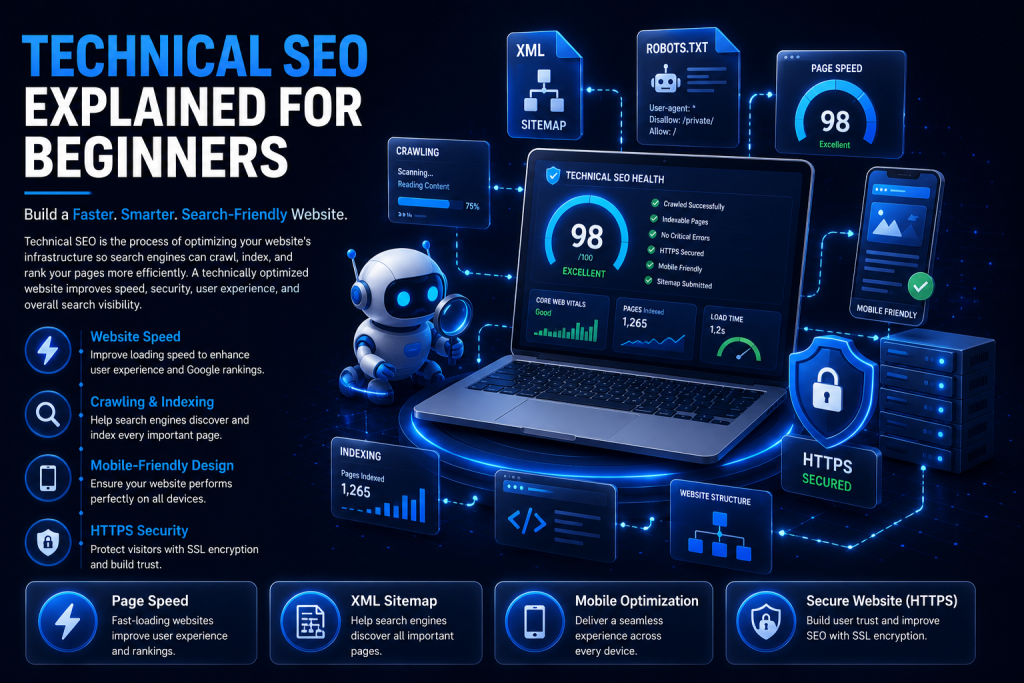
Introduction Technical SEO can sound intimidating, especially if you’re new to digital marketing. But at its core, it’s simply about making sure search engines can find, understand, and trust your website. Technical SEO is the practice of optimizing your website’s infrastructure — things like speed, security, and site structure — so search engines can crawl, index, and rank your pages effectively. Without a solid technical foundation, even the best content can struggle to appear in search results. Technical SEO directly affects how easily Google discovers your pages, stores them in its index, and decides where they belong in search rankings. In this beginner-friendly guide, you’ll learn exactly how search engines work and walk through 20 essential technical SEO elements, common mistakes to avoid, and a complete checklist to get started today. Table of Contents What is Technical SEO? Why Technical SEO Matters How Search Engines Work Key Elements of Technical SEO Common Technical SEO Mistakes Technical SEO Checklist Best Technical SEO Tools How to Measure Technical SEO Performance Pro Tips for Beginners Frequently Asked Questions Conclusion What is Technical SEO? Technical SEO refers to all the behind-the-scenes optimizations that help search engines access, understand, and rank your website. Unlike content or backlinks, technical SEO focuses on your site’s infrastructure — how it’s built, how fast it loads, and how easily it can be crawled. Think of it as the foundation of a house. Great content and backlinks are the walls and decoration, but without a solid technical foundation, everything else becomes unstable. Why Technical SEO Matters Even the most well-written, valuable content won’t rank if search engines can’t crawl or index it properly. Technical SEO ensures nothing stands in the way between your content and the search results page. It also directly affects user experience — a fast, secure, mobile-friendly website keeps visitors engaged, which Google rewards with better rankings over time. How Search Engines Work Understanding these three steps makes every other technical SEO concept easier to grasp: Crawling Search engines use automated bots, called crawlers or spiders, to discover pages by following links from one page to another across the web. Indexing Once a page is crawled, search engines analyze and store it in a massive database called the index. Only indexed pages are eligible to appear in search results. Ranking When someone searches, the search engine scans its index and ranks the most relevant, trustworthy pages at the top based on hundreds of signals. Key Elements of Technical SEO These 20 elements form the core of a technically healthy, search-friendly website. Work through them one at a time, starting with whichever feels most urgent for your site. 1. Website Crawling Crawling is how search engine bots, like Googlebot, discover pages by following links across the web. If bots can’t crawl your pages, they can’t rank them at all. Best practice: keep your site structure simple and link pages logically. Example: a new blog post gets crawled faster when it’s linked from your homepage. Mistake: orphan pages with no internal links pointing to them. Tip: submit an XML sitemap to help bots find new pages faster. 2. Website Indexing Indexing is when Google stores and organizes crawled pages in its database, making them eligible to appear in search results. A page can be crawled but still not indexed. Best practice: check indexing status regularly in Google Search Console. Example: use the URL Inspection tool to see if a specific page is indexed. Mistake: accidentally leaving a “noindex” tag on important pages. Tip: request indexing manually right after publishing new pages. 3. XML Sitemap An XML sitemap is a file listing all the important pages on your website, helping search engines find and understand your site structure. It speeds up discovery, especially for large or newer sites. Best practice: keep it updated automatically and submit it to Search Console. Example: yoursite.com/sitemap.xml. Mistake: including broken or non-indexable pages in the sitemap. Tip: most CMS platforms and SEO plugins generate sitemaps automatically. 4. Robots.txt File A robots.txt file tells search engine bots which pages or sections they’re allowed or not allowed to crawl. It helps you control crawl budget and keep sensitive pages out of search results. Best practice: only block pages that truly shouldn’t be crawled. Example: blocking /admin/ or /cart/ pages. Mistake: accidentally blocking your entire site with “Disallow: /”. Tip: always test your robots.txt file with Search Console’s tester tool. 5. SEO-Friendly URL Structure Clean, descriptive URLs help both users and search engines understand what a page is about. Simple URLs are easier to crawl, share, and rank. Best practice: use short, keyword-rich, lowercase URLs with hyphens. Example: /technical-seo-for-beginners works better than /page?id=284. Mistake: long URLs full of random numbers and parameters. Tip: avoid changing URLs after publishing; if you must, use a 301 redirect. 6. HTTPS Security HTTPS encrypts data between your website and its visitors, protecting sensitive information like passwords and payment details. It’s a confirmed Google ranking factor and builds visitor trust. Best practice: install an SSL certificate and redirect all HTTP traffic to HTTPS. Example: the padlock icon shown in the browser address bar. Mistake: mixed content errors where some resources still load over HTTP. Tip: most hosting providers now offer free SSL certificates. 7. Mobile-Friendly Website A mobile-friendly website adapts its layout and content for smaller screens automatically. Google uses mobile-first indexing, meaning it primarily evaluates your mobile version. Best practice: use responsive design that adjusts to any screen size. Example: text that resizes properly and buttons big enough to tap easily. Mistake: content that requires zooming or horizontal scrolling. Tip: test your site with Google’s Mobile-Friendly Test tool. 8. Page Speed Optimization Page speed measures how quickly your website loads for visitors on any device. Slow pages frustrate users and directly hurt your rankings. Best practice: compress images, enable browser caching, and minimize unnecessary code. Example: a page that loads in under 2 seconds keeps visitors engaged and reduces bounce rate. Mistake: ignoring speed until traffic and conversions start dropping. Tip: