Google Ads

Google Ads

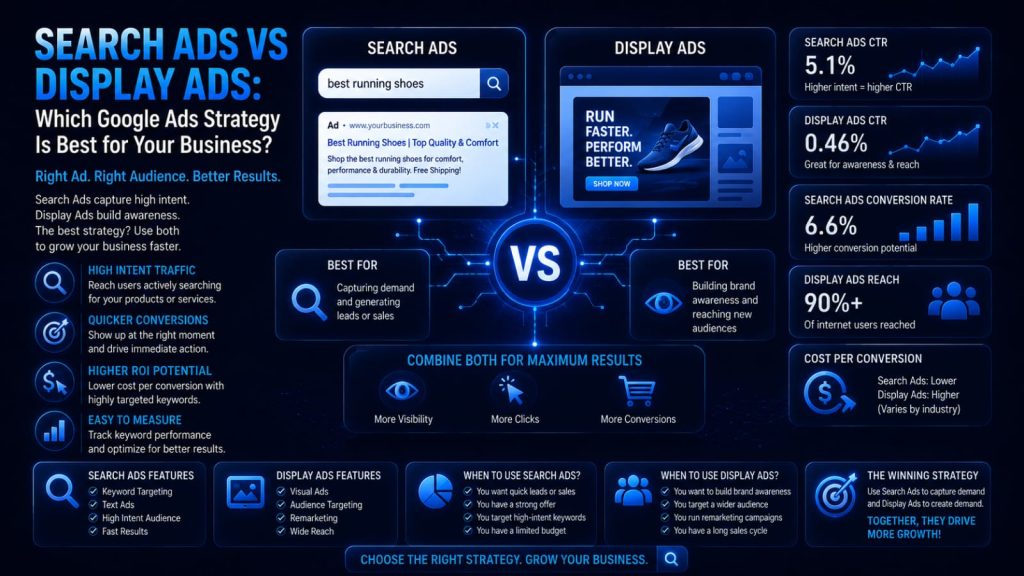
Search Ads vs Display Ads: Which Google Ads Strategy Is Best for Your Business?

Introduction Paid advertising is essential for consistent business growth, but many advertisers struggle to choose between Search Ads and Display Ads. Both live inside Google Ads, yet they work in very different ways. This guide compares them clearly so you can choose the right strategy for your goals. What Are Search Ads? Search Ads are text-based ads that appear on Google’s search results page when someone searches for a related keyword. Because they target active search intent, they’re highly effective for capturing demand from people already looking for a solution. Advantage: high purchase intent and strong conversion potential Limitation: can be competitive and costly for popular keywords What Are Display Ads? Display Ads are visual banner ads shown across the Google Display Network, a collection of millions of websites, apps, and videos. They target audiences based on interests, demographics, and behavior rather than active searches. Advantage: broad reach and strong visual brand storytelling Limitation: lower intent, so conversions are typically lower per click Search Ads vs Display Ads: Quick Comparison Factor Search Ads Display Ads Purpose Capture existing demand Build awareness & reach Format Text-based Image, banner, responsive Targeting Keywords, search intent Audience, interests, placements Cost Model Mostly CPC Mostly CPM Typical CTR Higher Lower Best For Lead gen, sales, local intent Brand awareness, remarketing When Should You Use Search Ads? Local service businesses with high purchase intent Emergency or urgent-need services E-commerce product searches with clear buying intent Lead generation campaigns targeting specific keywords When Should You Use Display Ads? Building brand awareness for a new product or business Remarketing to past website visitors Visual storytelling for lifestyle or aspirational brands Expanding reach to new, relevant audiences Search Ads vs Display Ads by Business Type Local businesses: Search Ads for immediate, nearby demand SaaS companies: Search Ads for intent, Display for awareness E-commerce: both, with Display for remarketing B2B companies: Search Ads for high-intent lead capture Startups: Display Ads to build early brand recognition Cost Comparison Search Ads typically use a Cost Per Click (CPC) model and can range widely based on keyword competition. Display Ads often use Cost Per Mille (CPM), pricing based on impressions, making them more affordable for broad reach campaigns. Targeting Options Search Ads: Keyword targeting, match types, negative keywords, location, device, and ad scheduling. Display Ads: Custom audiences, affinity and in-market audiences, demographics, topics, placements, and remarketing lists. Optimization Strategies For Search Ads: Improve Quality Score and Ad Relevance Optimize landing pages for conversions Refine keyword research regularly For Display Ads: Use Responsive Display Ads for better reach Segment audiences carefully Apply frequency capping to avoid ad fatigue Common Mistakes Search Ads: Using overly broad keywords without negatives Weak ad copy that ignores search intent Display Ads: Poor audience targeting leading to wasted spend Weak creatives that trigger banner blindness Skipping remarketing entirely Best Practices Match campaign type to funnel stage and goal Test Search and Display together for full-funnel coverage Use remarketing to re-engage past visitors Continuously test ad copy and creatives Monitor Quality Score and audience performance Measuring Success CTR, CPC, and CPM by campaign type Conversion rate and cost per acquisition (CPA) Return on ad spend (ROAS) and impression share Use Google Ads, Google Analytics 4, and Looker Studio to track and compare performance across both campaign types. Frequently Asked Questions 1.Which is better: Search Ads or Display Ads? Neither is universally better; Search Ads suit high-intent conversions while Display Ads suit brand awareness and remarketing. 2.Can I use both campaign types together? Yes, many successful strategies combine Search Ads for capturing demand with Display Ads for building awareness and remarketing. 3.Are Display Ads cheaper than Search Ads? Generally yes on a per-impression basis, though Search Ads often deliver higher conversion rates per click. Conclusion The right choice between Search Ads and Display Ads depends on your business goals, audience, and funnel stage. Many businesses benefit from combining both: Search Ads to capture active demand and Display Ads to build awareness and stay top of mind through remarketing. Build Your Google Ads Strategy With DIGIDIKSHA DIGIDIKSHA offers expert Google Ads management, PPC optimization, and complete digital marketing services to help you choose and execute the right advertising strategy. Contact us today to schedule a consultation and build a data-driven Google Ads strategy that drives real business growth.

Google Ads

Google Ads Quality Score Explained

Introduction Google Ads is one of the most powerful advertising platforms available, but two advertisers bidding the same amount can get very different results. The difference often comes down to Quality Score. This guide explains what it is, why it matters, and exactly how to improve it. What Is Google Ads Quality Score? Quality Score is Google’s rating, on a scale of 1 to 10, of how relevant and useful your keywords, ads, and landing pages are to searchers. You can view it in the Google Ads dashboard at the keyword level. A common misconception is that Quality Score directly determines cost, when in fact it’s a diagnostic signal that feeds into the auction. Why Quality Score Matters Quality Score directly influences Ad Rank, which determines your ad position and the price you pay per click. A higher Quality Score often means lower CPC and better ad positions for the same bid, improving overall budget efficiency and return on ad spend. How Google Calculates Quality Score Expected Click-Through Rate (Expected CTR) This measures how likely your ad is to be clicked when shown for a given keyword. Improve it by writing compelling, relevant ad copy that matches what searchers are looking for. Ad Relevance This reflects how closely your ad copy matches the intent behind the keyword. Tight keyword grouping and specific, intent-matched ad text improve relevance significantly. Landing Page Experience Google evaluates whether your landing page is relevant, fast, mobile-friendly, easy to navigate, and trustworthy, with a clear path to conversion. The Quality Score Scale Scores of 7 to 10 are generally considered strong, 4 to 6 average, and 1 to 3 poor. Remember that Quality Score is a diagnostic metric to guide optimization, not a KPI to chase for its own sake. Factors That Influence Quality Score Keyword relevance and search intent alignment Ad copy quality and historical CTR Landing page quality and mobile optimization Account and campaign structure Use of negative keywords and match types Step-by-Step Guide to Improve Quality Score Conduct thorough keyword research Group keywords into tight, relevant ad groups Write ad copy that matches search intent Test multiple ad variations for better CTR Optimize landing pages for speed and relevance Add negative keywords to filter irrelevant traffic Monitor performance and refine continuously Common Quality Score Mistakes Using overly broad keyword targeting Writing generic, non-specific ad copy Sending traffic to slow or irrelevant landing pages Ignoring search intent behind keywords Skipping A/B testing on ad variations Poor account organization and structure Overlooking negative keywords entirely Best Practices for Higher Quality Scores Keep ad groups tightly themed around one topic Match ad copy directly to keyword intent Continuously test and refine headlines Improve landing page speed and mobile experience Review search terms reports weekly Add negative keywords consistently Use Smart Bidding once you have enough conversion data Quality Score vs. Ad Rank Quality Score measures relevance and experience, while Ad Rank determines your actual ad position in the auction. Ad Rank is calculated using your bid, Quality Score, and expected impact of ad extensions. A strong Quality Score improves Ad Rank without requiring higher bids. Quality Score and SEO Quality Score and SEO share core principles, relevance, intent matching, and user experience, but they operate independently. Improving your landing pages for Quality Score often improves organic SEO performance as well. Measuring Success Quality Score and CTR trends Cost per click and cost per conversion Conversion rate and ROAS Impression share and landing page engagement Track these using Google Ads, Google Analytics 4, and Looker Studio for a complete performance picture. Frequently Asked Questions Is a Quality Score of 10 necessary? No. A score of 7 or higher is generally strong; chasing a perfect 10 often isn’t worth the extra effort. Can Quality Score reduce CPC? Yes, a higher Quality Score typically lowers the cost per click needed to achieve the same ad position. Why did my Quality Score drop? Common causes include declining CTR, landing page changes, increased competition, or shifts in search intent for your keywords. Conclusion Quality Score is a powerful diagnostic tool that rewards relevance and strong user experience with lower costs and better ad positions. Focus on tight keyword grouping, compelling ad copy, and optimized landing pages to build efficient, high-performing Google Ads campaigns. Improve Your Google Ads Performance With DIGIDIKSHAThis is a title DIGIDIKSHA offers expert Google Ads management, PPC optimization, landing page optimization, and complete digital marketing services to help you lower costs and boost conversions. Contact us today to schedule a consultation and maximize your Google Ads ROI with expert guidance.

Google Ads

Google Analytics 4 (GA4) for Beginners: The Complete Step-by-Step Guide

Introduction Google Analytics 4 — commonly known as GA4 — is Google’s free, privacy-first website and app analytics platform. It replaced Universal Analytics in July 2023 and is now the standard tool for measuring how people find, interact with, and convert on your website. Whether you run a blog, an e-commerce store, or a local business website, understanding GA4 is one of the most valuable digital marketing skills you can develop. In this beginner’s guide, you will learn exactly what GA4 is, how to set it up step by step, which metrics actually matter, how to track events and conversions, and how to use the data to improve your SEO, content strategy, and business growth. What Is Google Analytics 4 (GA4)? Google Analytics 4 is an event-based analytics platform that tracks user interactions across websites and mobile apps, giving businesses a unified, privacy-compliant view of how customers engage throughout their journey. Unlike its predecessor, Universal Analytics, which tracked sessions and page views, GA4 tracks individual events — every scroll, click, video play, and form submission is captured as an event. This gives a far richer, more accurate picture of user behaviour than session-based tracking could ever provide. Universal Analytics vs Google Analytics 4   Feature Universal Analytics Google Analytics 4 Data Model Session-based Event-based Event Tracking Manual custom setup Automatic enhanced measurement User Tracking Cookie-based only Cross-device via User ID + Google signals Reports Standard pre-built reports Flexible exploration + custom reports Cross-Platform Web only Web + App in one property Machine Learning Limited Built-in AI insights and predictions Privacy Features Basic Cookieless measurement, consent mode How to Set Up Google Analytics 4: Step-by-Step Go to analytics.google.com and sign in with your Google account. Click Admin (bottom-left gear icon) → then Create → Property. Enter your property name, select your reporting time zone and currency, then click Next. Under Data Streams, choose Web, enter your website URL and stream name, then click Create Stream. Copy the Measurement ID (starts with G-) and add it to your site — via Google Tag Manager, WordPress plugin (Site Kit or GA4 plugin), or by pasting the gtag.js snippet into your site’s <head> tag. Verify installation: go to Realtime in GA4 and visit your website in a separate tab. You should see 1+ active user appear within 30 seconds. Enable Enhanced Measurement in your Data Stream settings to automatically track scrolls, outbound clicks, video plays, file downloads, and site search without writing code. Filter internal traffic: go to Admin → Data Streams → Configure Tag Settings → Define Internal Traffic, then add your IP address. Set up Conversions: go to Admin → Events, find key events like form_submit or purchase, toggle Mark as Conversion. Link Google Search Console: Admin → Search Console Links → Link → choose your Search Console property.    Important GA4 Metrics Every Beginner Should Know Users: Total number of distinct visitors in the selected period. New Users: First-time visitors who have never visited your site before. Sessions: Groups of interactions one user takes within a given time frame. Engaged Sessions: Sessions that lasted more than 10 seconds, had a conversion, or had 2+ page views. Engagement Rate: Percentage of engaged sessions out of total sessions — replaces the old Bounce Rate as the primary UX signal. Average Engagement Time: The average time users actively interacted with your site (tab in focus). Event Count: Total number of events triggered across all sessions. Conversions: Events you have marked as business goals (form fills, purchases, sign-ups). Understanding Events and Conversions in GA4 GA4 tracks four types of events: Automatic events: Tracked the moment GA4 is installed — first_visit, session_start, page_view. Enhanced Measurement events: Enabled via toggle — scroll, click, video_start, file_download, search. Recommended events: Pre-defined event names Google recommends for e-commerce and apps — purchase, add_to_cart, sign_up. Custom events: Events you define yourself using Google Tag Manager or gtag.js for actions unique to your site. Any event can be promoted to a Conversion simply by marking it in Admin → Events. Conversions are the lifeblood of GA4 reporting — they tell you which channels and pages are actually driving business results.    How GA4 Helps Improve Your SEO Once you link Google Search Console to GA4, your organic search data flows directly into your reports. Here is how to use GA4 to power your SEO strategy: Identify top-performing pages by organic sessions in the Landing Page report Find high-bounce pages with low engagement rate that need better content or UX Track which organic landing pages drive the most conversions Analyse user journeys from organic entry points using the Path Exploration report Monitor device breakdown to ensure mobile users have a quality experience Use the Engagement → Pages report to find which content keeps users longest Google Analytics 4 Setup Checklist Task Status GA4 property created and named correctly   Web data stream added with correct URL   Tracking code installed and verified in Realtime   Enhanced Measurement enabled   Internal traffic filter configured   Conversion events marked   Google Search Console linked   Google Ads account linked (if running ads)      Common GA4 Mistakes Beginners Make Incorrect installation: Always verify via Realtime. Missing or duplicate tags cause data gaps that cannot be recovered retroactively. Not filtering internal traffic: Your own visits inflate traffic data and distort engagement metrics. Filter your office and home IP addresses from day one. Not setting up conversions: Without marked conversions, you cannot measure ROI or know which channels actually drive business value. Not linking Search Console: Organic keyword data is unavailable in GA4 without this link — a critical gap for any SEO effort. Misinterpreting Engagement Rate: GA4’s Engagement Rate is not the inverse of Bounce Rate. A 60% engagement rate means 60% of sessions were engaged — which is generally a good sign. Frequently Asked Questions 1.Is GA4 free to use? Yes. GA4 is completely free for the vast majority of websites. The only paid tier is GA4 360, which is designed for enterprise-level organisations

Google Ads

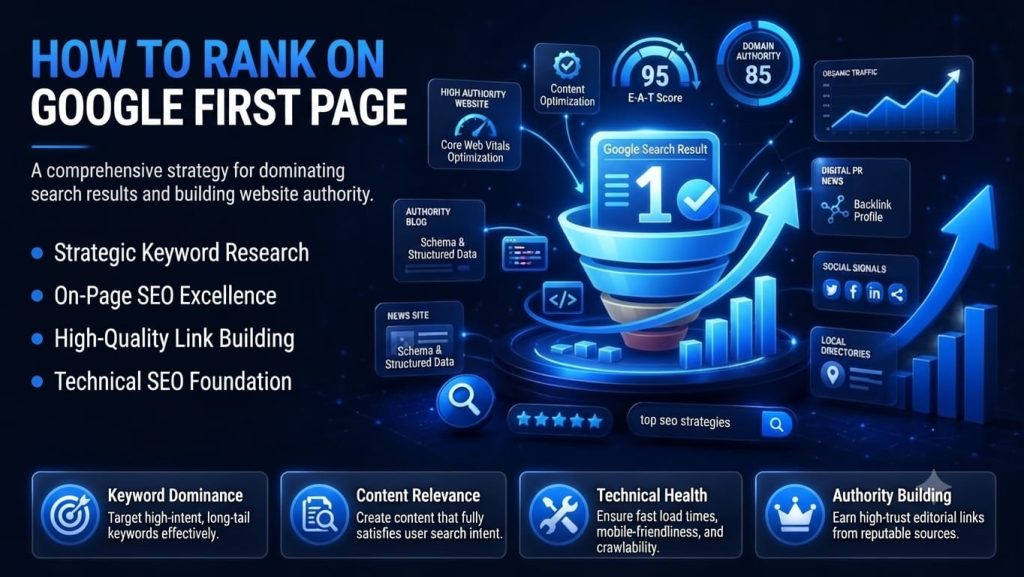
How to Rank on Google’s First Page

Introduction If your business website is not on Google’s first page, it is effectively invisible to the vast majority of potential customers. Research consistently shows that over 90% of clicks go to results on the first page of Google, and more than half of all clicks go to the top three results alone. Being buried on page two or beyond is, for most businesses, the same as not being ranked at all. Understanding how to rank your website on Google’s first page is one of the most valuable skills any business owner, marketer, or entrepreneur can develop in 2026. Unlike paid advertising, which stops generating traffic the moment you stop spending, SEO builds long-term organic visibility that compounds over time. A single high-ranking page can drive qualified traffic, leads, and sales for years with minimal ongoing cost. In this complete SEO guide, you will learn exactly how Google ranks websites, a step-by-step strategy covering keyword research, high-quality content creation, on-page and technical SEO, backlink building, user experience, and AI Overview optimization. You will also discover the most common mistakes that prevent rankings and the tools and trends shaping SEO in 2026. By the end of this guide, you will have a clear roadmap to sustainable first-page rankings. Why Google’s First Page Matters The data on user behaviour and click-through rates tells a compelling story. Studies consistently show that the first organic result on Google receives approximately 28-30% of all clicks for a given query. Position 2 earns around 15%, position 3 about 11%, and the figures fall off sharply from there. By the time a user reaches page two, the click-through rate drops below 1%. Benefits of First-Page Rankings •       Massive increase in organic traffic: Moving from position 10 to position 3 can multiply your organic clicks by five to ten times for the same keyword.•       Qualified leads with high purchase intent: People searching on Google are actively looking for a solution — organic traffic converts at two to three times the rate of social media traffic on average.•       Compounding returns: Unlike paid ads, a page that reaches the first page keeps generating traffic without additional spend.•       Improved brand credibility: Ranking organically signals to users that Google considers your site a credible, authoritative source — something paid listings alone cannot replicate.•       Business growth opportunities: First-page visibility puts you in front of customers at the exact moment they are ready to research, compare, and buy. Organic vs Paid Traffic Paid search ads offer immediate visibility at the top of results, but require continuous budget to maintain. Organic SEO takes longer to show results but delivers sustainable traffic that does not switch off when the budget runs out. The most effective digital marketing strategies use both — paid ads for immediate traffic while SEO builds a long-term organic asset. How Google Ranks Websites Understanding Google’s ranking process helps you align your website with what the algorithm values. Here is a simplified step-by-step explanation: 1.    Crawling: Google sends automated bots called Googlebots to discover new and           updated web pages by following links across the internet.2.    Indexing: Pages that are successfully crawled are stored in Google’s index — a             massive database of web content that search results are drawn from.3.    Ranking: When a user searches, Google analyses its index and ranks pages based         on hundreds of signals to determine which results will be most useful.4.    Search Intent: Google determines the primary intent behind each query —                   informational, navigational, commercial, or transactional — and ranks content               that best matches that intent.5.    E-E-A-T: Google assesses Experience, Expertise, Authoritativeness, and                           Trustworthiness of content and its creator. Pages demonstrating genuine E-E-A-T          rank more reliably.6.    Helpful Content System: Google’s algorithm actively rewards content created              primarily to help people, and demotes content created primarily to rank or game          the algorithm.7.    AI Overview: Google’s AI-generated summaries now appear above organic                 results for many queries, making it important to structure content so it can be               cited within these overviews.8.    Core Web Vitals: Google uses page experience signals — Largest Contentful               Paint , Interaction to Next Paint, and Cumulative Layout Shift — as ranking                     factors, making technical performance critical Step-by-Step Guide to Rank Your Website on Google’s First Page Step 1: Perform Keyword Research Keyword research is the foundation of every effective SEO strategy. It reveals exactly what your target audience is searching for, how competitive those searches are, and which terms are most likely to drive qualified traffic to your site. Types of Keywords Short-tail keywords: Broad, high-volume terms like “SEO” or “digital marketing.” Extremely competitive and difficult to rank for as a new or small website. Long-tail keywords: Specific, lower-volume phrases like “how to do local SEO for a small restaurant.” Easier to rank for and often higher purchase intent. Search intent: Always match your content to the intent behind the keyword — informational, navigational, commercial, or transactional. Keyword difficulty: A score indicating how hard it is to rank for a keyword. Target low-to-medium difficulty keywords when building a new site’s authority. Search volume: The average monthly searches for a keyword. Balance volume against difficulty to find achievable targets with meaningful traffic potential. Recommended Keyword Research Tools Google Keyword Planner — Free; directly sourced from Google’s own search data Google Trends — Free; shows search volume trends over time Ahrefs — Comprehensive keyword explorer with accurate difficulty scores SEMrush — Keyword Magic Tool with competitive analysis features Ubersuggest — Beginner-friendly free tier with keyword suggestions and basic metrics Pro tip: Target 3-5 long-tail keyword variations per page rather than trying

Google Ads

Google Ads vs SEO: Which is better for your bussiness?

Introduction If you have ever sat down to plan a marketing budget and found yourself stuck choosing between Google Ads vs SEO, you are not alone. It is one of the most common dilemmas small business owners, startups, and marketers face when deciding where to put their next dollar.Both channels promise visibility on Google, but they work in fundamentally different ways. SEO (search engine optimization) builds organic, unpaid visibility over time. Google Ads buys immediate placement at the top of search results through a pay-per-click auction. Each has distinct costs, timelines, and risks, and the “right” answer depends heavily on your business stage, budget, and goals.In this guide, we will break down exactly how SEO and Google Ads work, compare them side by side across the metrics that matter most (cost, speed, ROI, lead quality, and more), and show you real-world scenarios for local businesses, e-commerce stores, service providers, and startups. We will also cover how SEO is evolving in 2026 with AI Overviews and Generative Engine Optimization (GEO), and why the smartest businesses do not choose one channel exclusively — they combine both for a complete digital marketing strategy. What Is SEO? Search engine optimization (SEO) is the practice of improving a website so it ranks higher in organic (unpaid) search results. Rather than paying for clicks, SEO earns visibility by making a site more relevant, authoritative, and user-friendly than competing pages. How SEO Works Search engines like Google crawl and index billions of pages, then rank them for each query based on hundreds of signals — relevance, content quality, site structure, backlinks, user experience, and more. SEO is the ongoing work of aligning your website with those signals so it surfaces for the searches your customers are already making. On-Page SEO On-page SEO covers everything you control directly on your website:•       Keyword-optimized titles, headings, and body content•       Meta titles and descriptions that improve click-through rate•       Internal linking that helps users and search engines navigate your site•       Image alt text and structured, scannable formatting Off-Page SEO Off-page SEO focuses on signals from outside your website that build authority and trust, most notably backlinks from other reputable sites, brand mentions, and social proof. Search engines treat quality backlinks as a vote of confidence in your content. Technical SEO Technical SEO ensures search engines can crawl, render, and index your site efficiently. This includes site speed, mobile-friendliness, secure HTTPS connections, clean URL structures, XML sitemaps, and structured data (schema markup) that helps your pages qualify for rich results and AI Overviews. Local SEO Local SEO helps businesses appear in location-based searches and Google Maps results. It relies on an optimized Google Business Profile, consistent business citations (name, address, phone number), local reviews, and location-specific content — critical for any business with a physical presence or service area. Benefits of SEO •       Compounding returns: Content and rankings continue driving traffic long after           they are published.•       Lower cost per acquisition over time: No per-click fees once you rank.•       Builds authority and trust: Organic rankings are often perceived as more                   credible than ads.•       Sustainable traffic: Traffic does not disappear the moment you pause spending. Challenges of SEO •       Slow to show results: Meaningful ranking improvements typically take months.•       Requires consistent effort: Content, technical upkeep, and link building are                 ongoing.•       Algorithm changes: Google updates can shift rankings unexpectedly.•       High competition for top keywords: Established competitors can be hard to              outrank quickly. What Are Google Ads? Advertisers create campaigns, choose targeting (keywords, audiences, locations), set a budget and bid strategy, and write ad creative. Google runs an instant auction for each relevant search or impression, weighing bid amount alongside ad quality and relevance (Quality Score) to determine placement. Google Ads vs SEO: Side-by-Side Comparison

wpChatIcon
wpChatIcon
Scroll to Top